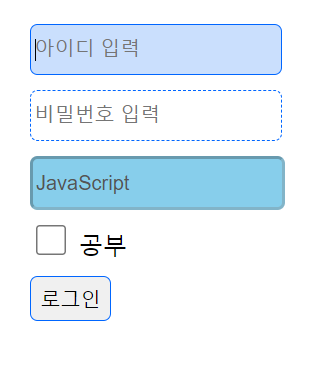
입력 양식 태그를 사용하여 아이디와 비밀번호를 입력 받는 입력폼과 서버단으로 데이터를 전송하는 서브밋 버튼을 생성하세요.
상태 선택자는 입력양식의 상태를 선택할 때 사용한다.
:focus는 입력폼에 마우스 커서를 위치시킨 input 요소를 선택한다.
:checked는 입력폼을 체크한 input 요소를 선택한다.
:enabled는 사용 가능한 입력 폼의 input 요소를 선택한다.
:disabled는 사용 불가능한 입력 폼의 input 요소를 선택한다.
속성 선택자
[type="submit"]는 input 요소의 type 속성값이 submit인 요소를 선택한다.
<!DOCTYPE html>
<html lang="en">
<head>
    <meta charset="UTF-8">
    <meta http-equiv="X-UA-Compatible" content="IE=edge">
    <meta name="viewport" content="width=device-width, initial-scale=1.0">
    <title>상태 선택자, 속성 선택자</title>
    <style>
        /*스타일시트는 아래쪽에 작성하면 "우성"이다.*/
        ul li {list-style:none;}
        input { /*input:enabled와 input:disabled를 모두 선택*/
            height:30px; margin-top:10px; border-radius:5px;
        }
        input:enabled {border:1px dashed #06F;}
        input:disabled {background:skyblue;}
        input:focus {
            background:rgba(80,150,250,0.3);
            border:1px solid #06F;
            outline:0; /*박스 바깥쪽 영역에 생기는 라인:input, image*/
        }

        /*속성 선택자*/
        input[type="checkbox"] {width:20px; height:20px;}
        input[type="checkbox"]:checked {width:25px; height:25px;}
        input[type="submit"] {border:1px solid #06F;}
    </style>
</head>
<body>
    <form action="" method="post">
        <ul>
            <li><input type="text" name="id" placeholder="아이디 입력" autofocus required></li>
            <!-- autofocus 옵션은 입력폼에 커서를 자동으로 위치시키는 옵션이다. required 옵션은 필수 입력 항목으로 지정하는 옵션이다. -->
            <li><input type="password" name="pwd" placeholder="비밀번호 입력" required></li>
            <li><input type="text" name="js" value="JavaScript" disabled></li>
            <!-- disabled 옵션은 입력폼을 비활성화 상태로 하여 입력할 수 없다. -->
            <li><input type="checkbox" name="hobby" value="공부"> 공부</li>
            <li><input type="submit" value="로그인"></li>
        </ul>
    </form>
</body>
</html>
결과