1. 네이버에서 ico 컨버터 검색
2. Bitmap To Icon Converter 설치
3. Photoshop에서 Favicon 제작
4. Bitmap To Icon Converter로 ico 파일 제작
5. HTML 문서에 포함
<!DOCTYPE html>
<html lang="ko">
<head>
    <meta charset="UTF-8">
    <meta http-equiv="X-UA-Compatible" content="IE=edge">
    <meta name="viewport" content="width=device-width, initial-scale=1.0">
    <title>파비콘</title>
    <link rel="shortcut icon" href="imgs/favicon.ico">
    <style>
        * {
            margin:0; padding:0; box-sizing:border-box;
            transition:all 0.4s ease;
        }
        body {background:#E2E2E2;}


        @media screen and (min-width:1000px) {
            .box {
                position:relative;
                width:400px; height:200px; margin:50px auto;
                background:#FFF; border-radius:10px; overflow:hidden;
            }
            .txt {
                position:absolute; left:0; top:0;
                width:200px; height:100%;
                background:#FFF;
                transform:skew(25deg);
            }
            .txt h3 {
                width:180px; padding:80px 0 0 50px;
                font-size:20px; text-transform:uppercase;
                transform:skew(-25deg);
            }
            .txt p {
                width:180px; padding:10px 0 0 15px;
                font-size:14px;
                transform:skew(-25deg);
            }
            .icons {
                position:absolute; left:25%; top:0;
                width:300px; height:100%;
                background:skyblue;
            }
            .icons i {
                padding-left:180px;
                font-size:54px; line-height:200px;
            }
        }
        @media screen and (max-width:999px) {
            .box {
                position:relative;
                width:200px; height:400px; margin:50px auto;
                background:#FFF; border-radius:10px; overflow:hidden;
            }
            .txt {
                position:absolute; left:0; top:-45px;
                width:200px; height:200px;
                background:#FFF;
                transform:skewY(-25deg);
            }
            .txt h3 {
                width:180px; padding:80px 0 0 20px;
                font-size:20px; text-transform:uppercase;
                transform:skewY(25deg);
            }
            .txt p {
                width:180px; padding:10px 0 0 20px;
                font-size:14px;
                transform:skewY(25deg);
            }
            .icons {
                position:absolute; left:0; top:0;
                width:500px; height:100%;
                background:skyblue;
            }
            .icons i {
                padding:250px 0 0 75px;
                font-size:54px;
            }
        }

    </style>
    <script src="https://kit.fontawesome.com/11390cb447.js" crossorigin="anonymous"></script>
</head>
<body>
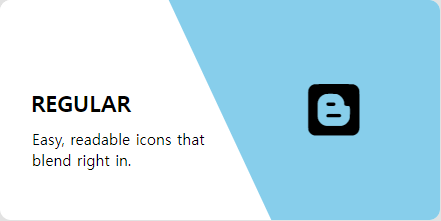
    <div class="box">
        <div class="icons"><i class="fa-brands fa-blogger"></i></div>
        <div class="txt">
            <h3>regular</h3>
            <p>Easy, readable icons that blend right in.</p>
        </div>
    </div>
</body>
</html>